The £229/$229 WiiM Sound Lite isn’t your conventional PC speaker, but one I think is a very clever addition to a desktop setup for use with movies, games and for general viewing. It might look like a conventional Wifi speaker, but underneath is one of the most feature-rich audio products I’ve tested at its modest price tag.
It is, on its own, a self-contained unit in a similar vein to a Sonos Era 100, or an Apple HomePod (in fact, its cylindrical shape and fabric grille give off major HomePod vibes) that provides up to 100W of power and makes use of a 4-inch paper cone woofer and a pair of 1-inch silk dome tweeters to help bring the noise. It’s a very smart-looking unit with an excellent fit and finish, is available in either black or white, and is smaller than you may anticipate. Against the more expensive WiiM Sound, it lacks the screen and the remote, leading to a £70/$70 saving.
Think of it more as a beefed-up wifi speaker that you can use to play music from all manner of streaming services via the WiiM Home app that’s stable, feature-rich and very easy to use. I think setup took me around seven minutes, and that included a hefty firmware update.
There are a vast range of supported means of listening to your favourite tunes, with support for the ‘Connect’ variants of Tidal, Spotify and Qobuz, plus Google Cast, Alexa Cast, Logitech Media Server, and good old Bluetooth 5.3. It’s also Roon Ready if you’re a paid-up subscriber, and will accept music over the WiiM Home App from a network server via DLNA (which is what I’ve been doing with my QNAP NAS over Plex). If you’re an Apple user, you’ll find AirPlay 2 a sore miss, especially as rival options have it.

Multi-room support with other WiiM devices, including my WiiM Ultra streamer, works seamlessly, too, if you want to create a WiiM empire of audio – a WiiM-pire, I suppose.. Plus, you can also use WiiM’s clever ‘Roomfit’ room correction tech to optimise the Sound Lite’s audio for your room using your phone’s microphone – this works in a similar fashion to Sonos’ TruePlay if you’re familiar with that.
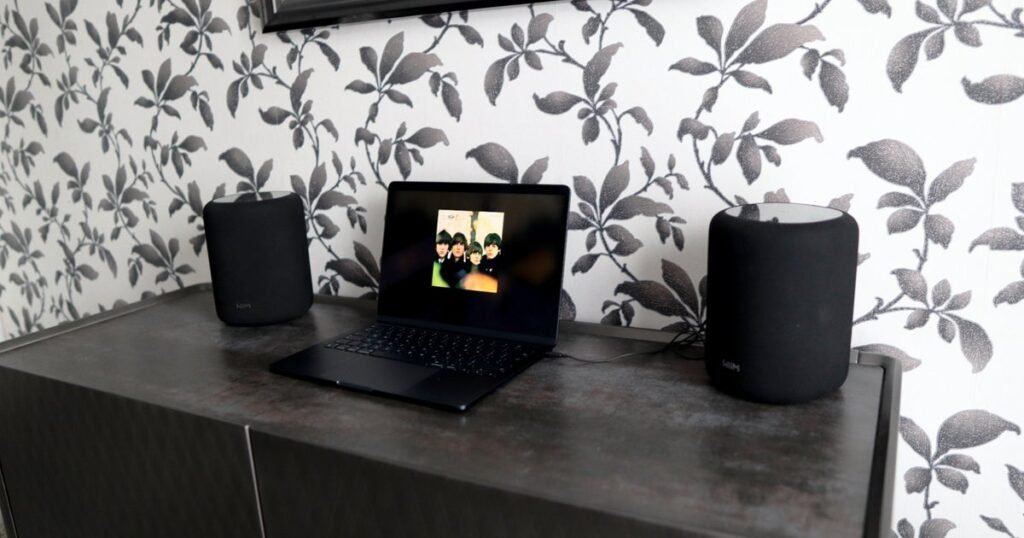
For wired use, there’s a 3.5mm jack on the underside along with an Ethernet port for a more stable and wired network connection, and a figure eight power cable connector. To get audio out of the 3.5mm jack, it’s a case of selecting the line-in as an input for it to present audio from a wired source that isn’t a streaming service in the WiiM Home app, or over Bluetooth 5.3. I had no troubles either using it in its traditional Wifi speaker form in the corner of my living room, or on a rudimentary desktop setup with my MacBook with the 3.5mm jack with two Sound Lites in a stereo pair, although more on that in a moment.
The audio it provides is much wider than the size of the cabinet, with surprisingly solid width, bright, easy treble, and excellent detail retention. By default, there is a fair amount of bass, which lent well to my usual suite of rock testing tracks over Tidal and from my Plex server, although this can be dialled back with the extensive EQ settings in the WiiM Home app. Streaming the likes of If you’re in the mood for a party, the Sound Lite can also get plenty loud with some real room-carrying volume.

I found the Sound Lite to provide good power during the drums and gritty guitar lines on Fish’s The Rookie, with the vocal placed in the centre of the mix – almost between the two speakers.
Moving over to James Taylor’s September Grass, the Sound Lite came across as rich and authoritative, especially with the additional bump in the low end, with some lovely separation in the stereo pair for picking out details such as additional inflexions of cymbals or acoustic guitar work that carried some wonderful detail.
George Benson’s Affirmation is always a good test of soundstage, and the stereo pair gives a lot more depth and width than the single Sound Lite, which is perhaps to be expected. On its own, the soundstage of the Sound Lite is wider than the compactness of the unit would suggest, although adding another in stereo form certainly takes the immersion up a tick, and there’s lot of fine detail to be extracted from the fidelity of the track and the Sound Lite itself.
Unlike other, dearer single-box speaker systems, the Sound Lite isn’t necessarily as discerning with its source choices. Of course, as much as it’ll support 24-bit/192KHz playback for properly hi-res audio, it isn’t as revealing if you run some bog-standard lower bitrate internet radio from it via the WiiM Home app. It’s very easy to set up presets from its selection of BBC local and national radio options, or using TuneIn, for instance, or you can find a network stream for a specific station and add that as its own preset with its own artwork in the app. There is likely, of course, some DSP processing going on to optimise the audio coming from a station as much as possible, and for casual radio listening, it’s surprisingly capable.

Where the Sound Lite becomes very clever, and an ideal desktop companion, is if you add another one to the party, as you can create a stereo pair of these in the WiiM Home app in a matter of moments for even greater separation and immersion, and there’s very little discernible latency between the speakers, which works rather well for music, movies and more cinematic games in my testing, such as in Forza Horizon 5 and even EA FC 26. For competitive titles such as Counter Strike 2, you’ll want to stick with a headset, of course.
With the two speakers grouped in the WiiM Home app, you can select one to be the left channel and one to be the right via a wireless link. No need to put a cable between the pair – all you need is another power cable for the second speaker. Or, you can grab a cheaper 3.5mm splitter cable that feeds one output into two inputs if you’d prefer the peace of mind of a wired connection. When using them in a stereo pair, you’ll need to choose which one of the two speakers is the ‘main’ device that controls everything. For stereo use over 3.5mm, plug your laptop or PC into the host, and it’ll broadcast to both speakers as long as you’ve got the Aux input selected in the WiiM Home App.
The stereo pair also works with Tidal Connect and Spotify Connect in their respective apps, if you cast to the ‘host’ speaker, as opposed to having to directly use the WiiM Home app. Using it via Chromecast with Plexamp (for instance) would require a separate grouping of the speakers in the Google Home app (which casts the audio to both speakers simultaneously and not in separate left and right channels), but this can be mitigated by using the WiiM Home app and its direct Plex integration.

If you want to expand the system down the line with one of WiiM’s subwoofers, or expand to a WiiM amp or streamer with additional active speakers, you can get yourself a competent surround system without much of the fuss. WiiM has also said the Sound and Sound Lite models will be able to be used as rear or centre channels for a proper surround system in the future, although it isn’t natively set just yet.
While it may be an off-the-wall choice for a PC speaker, the WiiM Sound Lite is one of the most versatile and capable choices out there for its price point, whether you want one, two, or a whole house full of WiiM’s products. It looks excellent, provides a rich and full-bodied sound either with a singular unit or as a stereo pair, and is just as happy in an office, a living room or a kitchen. Plus, it doesn’t really cost the earth for the versatility you’re getting.