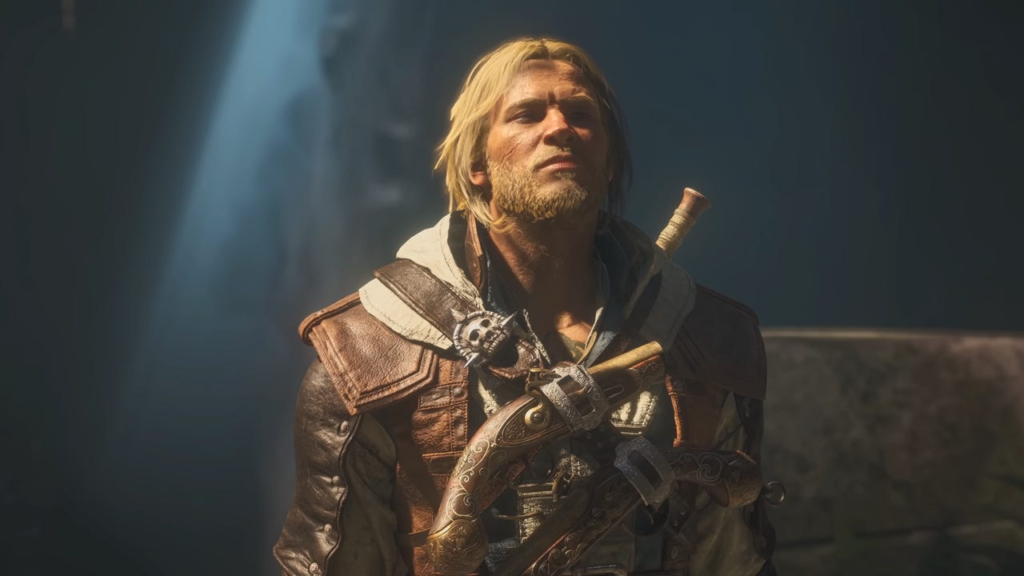
Assassin’s Creed IV: Black Flag came out way back in 2013, and while the game was demanding for its time, PC gaming has come a long way in the last thirteen years or so. If Ubisoft simply released a remaster for the game, it’d likely be extremely easy to run, even on weaker hardware. But, instead, the game uses the same version of the Anvil Engine as last year’s Assassin’s Creed Shadows, and that game was absolutely gorgeous, even if it was hard to run on low-end hardware.
With Black Flag Resynced, though, Ubisoft seems to have widened the net of hardware that’ll be able to run the game well. Because where I wouldn’t even think about running Assassin’s Creed Shadows on a handheld gaming PC, Black Flag Resynced has three whole presets for handheld gaming PCs.
At the high-end, Black Flag Resynced is an incredibly gorgeous and demanding PC game, but it’s still scalable enough to run on pretty much any modern machine. Ubisoft itself is only requiring an AMD Ryzen 5 3600 and an AMD Radeon RX 5500 XT to run the game, and that’s not exactly a ton of horsepower.

What’s Old is New Again
Even though Assassin’s Creed Black Flag Resynced is a remake of a now-ancient game, it’s absolutely stunning. The game looks a lot like Shadows, with luscious vegetation and some of the most beautiful water effects I’ve seen lately. The latter is super important, obviously, as you spend a lot of time on the Jackdaw doing, you know, pirate stuff.
That’s actually where the game performs best, too, in my experience. The worst performance patches are when you’re walking through a crowded street with a lot of NPCs. But when you’re out sailing and engaging in a bit of ship-to-ship combat, frame rates soar. This is likely because the game doesn’t have to render so many individual NPCs, and the wide-open areas make shadow work a lot less demanding.
Luckily, Ubisoft actually included a wide array of knobs and buttons to let you tune how the game looks and performs. Unlike 007 First Light, which launched back in May with no graphics preset and a pretty small amount of individual settings to change, Black Flag Resynced has 10 different presets ranging from “Handheld Low” to “Ultra High”. And beyond just the presets, there are 20 different settings you can tweak to really dial the image in.
Just like with pretty much every modern game, Ubisoft released system requirements for Black Flag Resynced calling out certain resolutions and quality settings for each ‘tier’ of hardware. For its 1440p setup, which I still think is the golden standard of PC gaming, Ubisoft calls for an RTX 3080 or an AMD Radeon RX 6800 XT. I don’t have a 3080 lying around right now – that GPU is six years old at this point – but I do have an RTX 4070, which performs at about the same level. Now, Ubisoft says it should be able to do 60 fps on the ‘High’ preset with ray tracing set to ‘Standard’ at 1440p, and that’s with dynamic resolution and DLSS enabled.
With those settings, the RTX 4070 is able to exceed that 60 fps threshold, coming in with an average of 76 fps. But, when I turn off dynamic resolution and leave DLSS set to ‘balanced’, the frame rate actually goes up, averaging 100 fps, but with a bit of a softer image. That’s because the dynamic resolution algorithm wants to keep you as close to 60 fps as possible, scaling up the resolution when it has the overhead to do so.
Of course, I’m never satisfied just using a preset, so I did a bit of tweaking, lowering the quality of clouds and getting rid of hair strands, in order to boost water quality, loading distance, and ‘micropolygon,’ which reduces pop-in at the cost of memory – and the 4070 has plenty to spare at 1440p. With my custom settings, I got an average of 101 fps, but with better water and less pop-in. And, sure, hair doesn’t look as good, but does that really matter in a game where you’ll be spending a lot of time on a ship in the middle of the ocean? I don’t think it does.
Even if you don’t like upscaling, my custom settings get an average of 65 fps at native 1440p. However, they do dip down to the high 50s when you’re in a crowd.
Best PC Settings for Assassin’s Creed Black Flag Resynced
For most people that just want to boot up the game, pick a graphics preset and just start playing, Assassin’s Creed Black Flag Resynced is one of the best games to do that with. But, if you want to dive in and get the best image without losing too much performance, you’re going to have to tweak the settings a bit. Luckily, I can help explain what all the little knobs actually do.
Black Flag Resynced Optimized PC settings (mainstream PC)
Particles Quality
Very High
Texture Resolution Quality
High
Loading Distance
Very High
Terrain Texture Quality
High
DLSS / FSR / XeSS
Balanced or Native AA if you prefer native rendering
Black Flag Resynced Optimized PC settings (handheld gaming PC)
Particles Quality
Very Low
Texture Resolution Quality
Low
Screen Space Effects
Very Low
Terrain Texture Quality
Very Low
DLSS / FSR / XeSS
Balanced
Raytracing Mode: Ubisoft has included two different types of presets here, just like it did with Assassin’s Creed Shadows. The standard mode just enables ray traced global illumination, and the extended mode also enables ray traced reflections. Unless you have a beast of a GPU, I’d recommend sticking with standard. It doesn’t tax performance too much, and it does make the game look quite a bit better.
Raytracing Quality: This changes the resolution and quantity of rays being cast. When you set the ray tracing mode to standard, this will default to Medium. You can turn it up if you want, but it will make a huge impact to performance, especially in complicated scenes and it doesn’t even make that big of a difference to image quality.
BVH Quality: BVH stands for bounding volume hierarchy, which essentially calculates how many objects in the environment rays can bounce off of. Basically, lower settings means light rays bounce off of fewer objects, and higher settings means more light bounces. Just like with ray tracing quality, leave this as-is unless you have a powerful GPU.
Character Quality: This changes how NPCs look. Unlike some games, this is baking in a lot of different settings into one. This will change character meshes, shadows, and can even wipe the beards off of characters faces. I’d leave this on high, because crowds are already the most demanding part of this game, and changing to very high doesn’t really make a difference.
Hair Strands: This setting will animate individual hair strands either just on Edward Kenway’s head or on every character. As cool as the effect looks, I don’t think it’s a really valuable use of GPU resources. But, hey, if not having more realistic hair is a dealbreaker for you, it’s there if you want it. Everyone else should probably just turn it off, though.
Post Effects: Just like with character quality, this setting changes the quality of all the post-processing effects. Things like bloom, LoD and godrays. I leave it on high, but if you like those spiffy little effects, feel free to turn it up a bit, it won’t make that much of a difference to your performance.
Particles Quality: This simply changes the quality of particle effects. There are a lot of them in Black Flag Resynced, so I’d keep it as high as you can without losing performance. However, the stronger your CPU is, the less of an impact this will have.
Water Quality: This changes the quality of the water. Honestly, this is probably the most important setting here. This game is famously chock-full of the stuff, and it looks absolutely stunning when it’s maxed out. I would lower other settings just to have the water quality higher. But, obviously if you have a lower-end GPU, you might have to make do with lower settings.
Texture Resolution Quality: This is just the texture quality setting. Turn it down, and the resolution of textures goes down. Turn it up, and the opposite happens. Rule of thumb is to turn it up as high as you can without running out of VRAM. With the RTX 4070, that didn’t happen, but if you have less than 8GB of VRAM, you’ll have to turn this down
Loading distance: This changes the distance at which objects are loaded into the game. Whenever I’m playing a huge open world game like Assassin’s Creed, especially when there’s a whole mechanic built around climbing huge towers to scope out your surroundings, I like having the load distance higher. Now, that comes at the cost of VRAM and CPU performance, so turn this down if you start stuttering.
Geometry Quality: While loading distance changes how distant objects are rendered, this changes the quality of nearby objects. There’s very little difference between high and very high, so I’d just leave it at high unless you’re facing VRAM issues.
Micropolygon: Micropolygon sounds like the name of a King Gizzard and the Lizard Wizard album, but it’s actually awesome that Ubisoft has included it here. This changes the amount of memory allocated to render objects in the scene. Turning it up reduces pop-in. I’ve been playing the game with this setting maxed out and have experienced virtually no texture pop-in. This is worth cranking up if you have the VRAM budget for it.
Screen Space Effects: This is another setting that changes multiple things, namely ambient occlusion and reflections. These are some of the most taxing effects in modern games, so they should be the first thing you turn down when you’re running into performance problems. On the 4070, though, I run it at high, and have no problem staying above 60 fps.
Light Source Quality: This changes the quality of the light sources in the game. This is another setting that’ll really push your GPU, so I’d leave it high unless you have a powerful card like the RTX 5070 or Radeon RX 9070. It does look pretty good maxed out, though.
Shadow Quality: This changes the quality of shadows, and also how far away from you they can render. Shadows are always an effect that can hit performance hard, but the high setting keeps the game looking rich, without tanking your frame rates too much.
Cloud Quality: This might be a hot take, but I don’t really care how the skybox looks in a game. This setting can make the clouds look absolutely gorgeous, but unless you’re staring at the sky, you’re probably not going to notice it. As such, this is one of the first things I’d turn down, just to move some of the GPU budget towards things that matter, like water quality.
Fog Quality: This setting changes the density of fog effects. Just like with clouds, it’s nice to have really nice looking fog, but not a necessity. Turn it up if you have oodles of GPU budget, but it’s not really worth its performance cost.
Terrain Quality: Another setting that changes two settings. This changes the loading distance of terrain geometry, and also affects tesselation. Leave this one at high, there really isn’t that much of a difference between that and the ultra high setting.
Scatter Density: This just changes the density of clutter on the ground. I have it set to high, but I can barely tell the difference between the low setting and the highest setting.
Deformation: Deformation just changes the quality of things like footprints in the sand. It’s a minor effect, but it’s always cool leaving footprints in the terrain. But this is another effect that you can turn down to save GPU budget.
Terrain Texture Quality: What do you know, a second texture quality setting has appeared! This just changes the textures of terrain, which will be particularly noticeable on beaches. Just like the other texture setting, turn this as high as your VRAM will allow. It won’t really impact performance until you run out of memory.
Jackie Thomas is the Hardware and Buying Guides Editor at IGN and the PC components queen. You can follow her @Jackiecobra